104 articles
Certain builds in Last Epoch are very reliant on one specific skill. These builds will want to maximize the usage of that skill and pretty much instantly cast it when it’s off cooldown. Doing this manually will eventually become very tedious and annoying.
Luckily, you can utilize auto-cast to instantly cast a spell when it’s off cooldown. Auto-cast works on its own, and all you will need to do is configure it into your game. So, how do you use the auto-cast mechanic in Last Epoch?
How to Auto-Cast Skills
Last Epoch allows you to change the input command for a skill. By default, skills in this game are cast using the numbers 1-5 on your keyboard. You can also assign an additional input that can cast the skill.
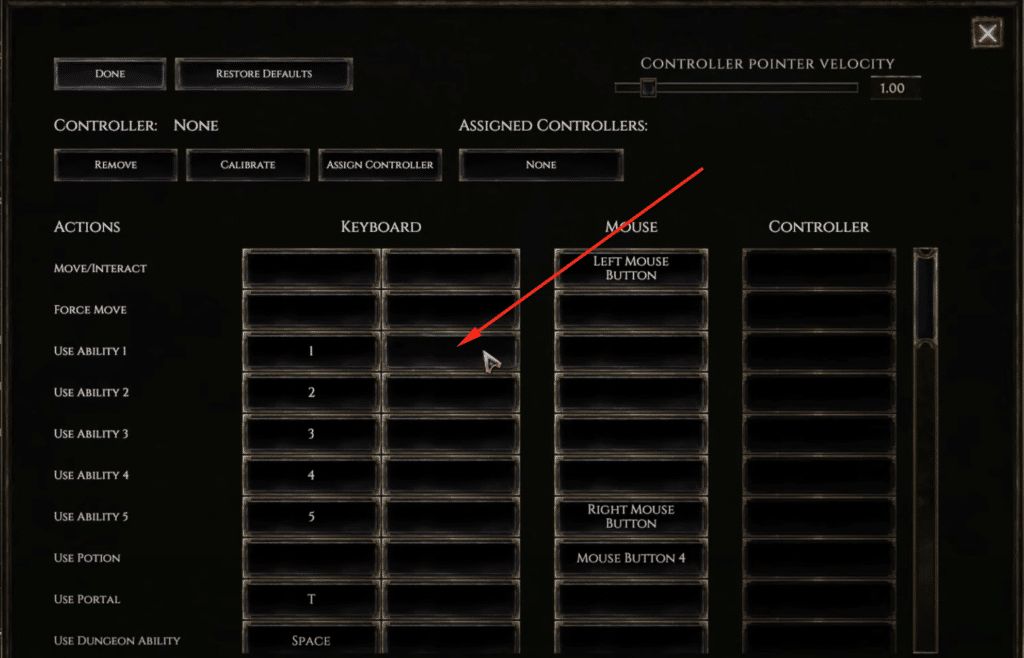
So for auto-casting, you must assign the skill to a number on your numeric keypad (keybinds). A numeric keypad for this method is very important, as you won’t be able to use auto-cast without it.
 Everything New In Last Epoch Season 4Mar 29, 2026
 How To Progress Through Endgame In Last Epoch For New And Returning Players (Season 4)Mar 28, 2026
 How To Get A Lot of Corruption in Last Epoch Season 4Mar 28, 2026
Check out our article on how to set up custom keybinds in Last Epoch.
You can assign 2 different inputs for a skill, so you can have the skill on its original input alongside the new input you are adding.
Auto-casting is generally used to cast 1 specific skill that is the most important skill for that build. Builds like the Echo Warpath build become much easier to play with auto-casting.
Using Auto-Cast in Game
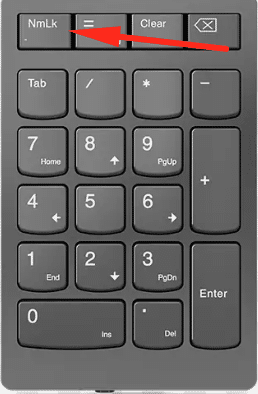
Once you assign the skills to your numeric keypad, you will then need to set up the auto-cast. To do this, all you need to do is hold down the key you assigned the skill to, press the Num Lock key once, and then let go of the key you were holding down.
Doing this will enable auto-cast and the skill will automatically recast once it is off cooldown. The next time you load the game or enter a new area, just set up the auto-cast again and watch the skill cast itself.