 19 articles
Battlefield 6 is coming out in a couple of months, and a lot of people are hyped for it due to how it seems to be a huge improvement over 2042, which has been quite a disappointment to long-time fans. There are plenty of features to keep in mind that you can mess around with in the settings menu, and that includes the basic crossplay feature. In this guide, we will be showing you how to turn crossplay on or off.
How To Turn Crossplay On / Off in Battlefield 6 on PS5
Before we begin, just know that this is based on the open beta version of the game, and we are unsure of how this will look like when the game actually comes out. Remember, release is still a couple of months away, so who knows what they will change after this public beta test.
Now, if you are playing the beta version, simply open the game’s settings menu. There, you will have to scroll over to the System tab. The very first option you will see there is the Cross–Play feature. Obviously, all you have to do here is either turn it on or off depending on what you want.
One important thing to note is that you cannot change this setting while you are in the middle of matchmaking or once you have already joined a match. This applies to party members too, so if any member of your party is already in a server somehow, you cannot change this option.
 Battlefield 6 No Longer Counts Bot Kills Toward Your Kill-Death Ratio Following a Recent UpdateNov 19, 2025
 Battlefield 6: Best Attachments to Use And What Do They DoNov 18, 2025
 Battlefield 6 Players Found a Secret Room in the Shooting Range, Prompting a Handful of TheoriesOct 31, 2025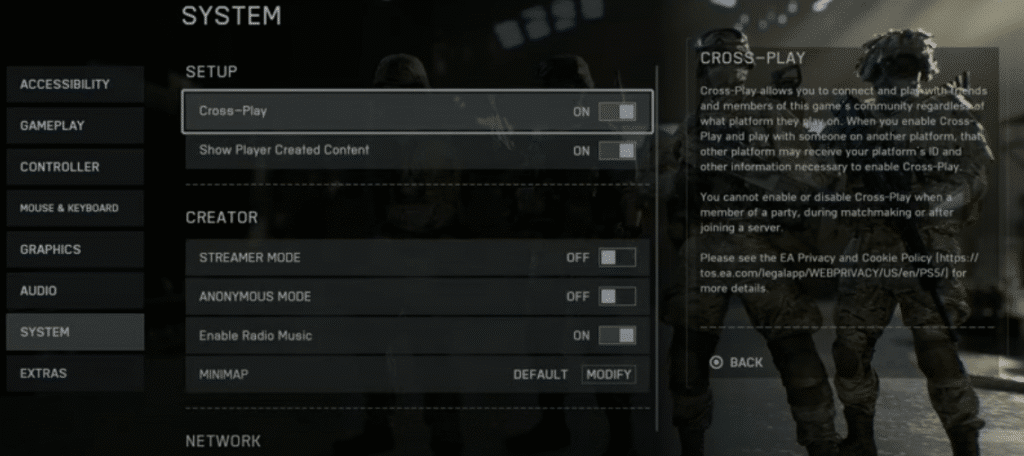
Congratulations, you have now turned it on or off. Before you get to playing, make sure to explore the rest of the options, as there are really no hidden things here that you cannot figure out yourself, since all the settings are laid out in plain sight.
While you are here, make sure to check out this best settings guide for Battlefield 6 (PC, PS, and Xbox) to see how you should be setting up your game for the best possible experience. Again, it is worth noting that this is only based on the open beta version of the game, which will likely not even be accessible anymore by the time you read this and might not reflect the final product.