 3 articles
Getting force feedback (FFB) right in EA Sports WRC with a Logitech G920 isn’t a science you just set and forget, at least not if you actually want the car to talk back to you instead of feel like a loose Joy-Con.
There isn’t a single official “pro” preset from the developer for each wheel, so what we know comes from real players testing settings and community-driven recommendations.
Optimizing Your Steering Wheel
With a wheel like the Logitech G920, you’re balancing two things: the wheel base settings (like rotation and spring/damper in Logitech software) and the in-game FFB sliders. The goal is to feel what the car’s doing, weight under load, grip at the front, the road surface, and transitions, without fighting a wheel that’s too heavy or too floaty.
Logitech Software (G HUB / Profiler) Basics
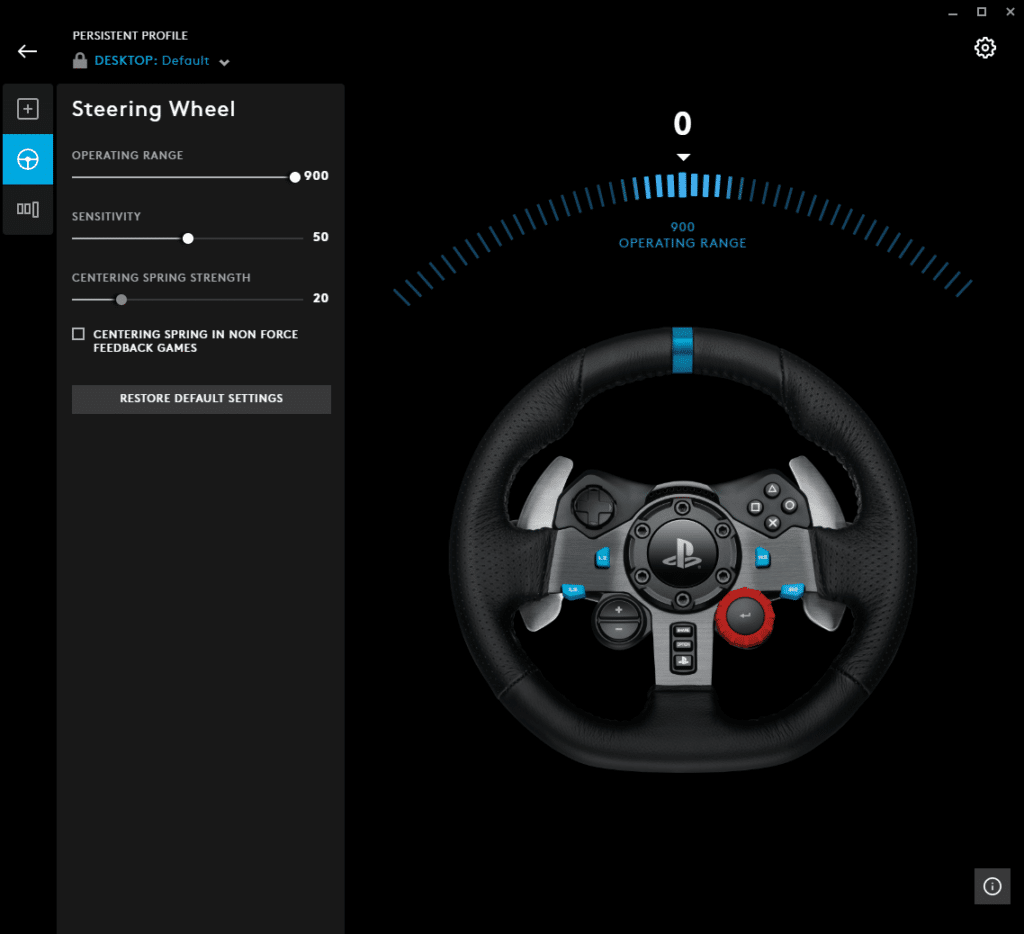
First, make sure your wheel hardware side is set up right before touching WRC settings. Most racers agree you should:
 WRC: Best Logitech G932 Force Feedback SettingsJan 23, 2026
 WRC: Best Thrustmaster T300 RS Force Feedback SettingsNov 7, 2023
• Set the wheel’s operating range to 900° in Logitech G HUB or Logitech profiler. This gives your wheel full rotation authority to match rally cars’ steering movement.
• Turn off centering spring or spring strength in the driver software. This stops artificial self-centering forces that conflict with in-game FFB and make the wheel feel “rubbery” or disconnected.
• Leave damper/spring in the profiler low or off — the game sends most forces itself.
These base steps help ensure what the game sends isn’t muddled by extra effects from the hardware layer.
Basic Logitech G920 / G29 / G923 Setup
These wheels share the same generation of dual-motor force feedback hardware. Here’s what most experienced players recommend for WRC’s FFB to make rally physics feel more alive:
First, clean up the wheel side in Logitech G HUB (or Logitech Profiler if you’re not on G HUB). The standard advice from people testing these wheels is to:
• Set the Operating Range to 900° so the in-game steering and wheel movement match. This means fewer calibration quirks and more accurate vehicle response.
• Turn off centering spring or any artificial spring/damper in the driver software — the game’s FFB should do all the heavy lifting.
In-Game Force Feedback Settings That Players Like
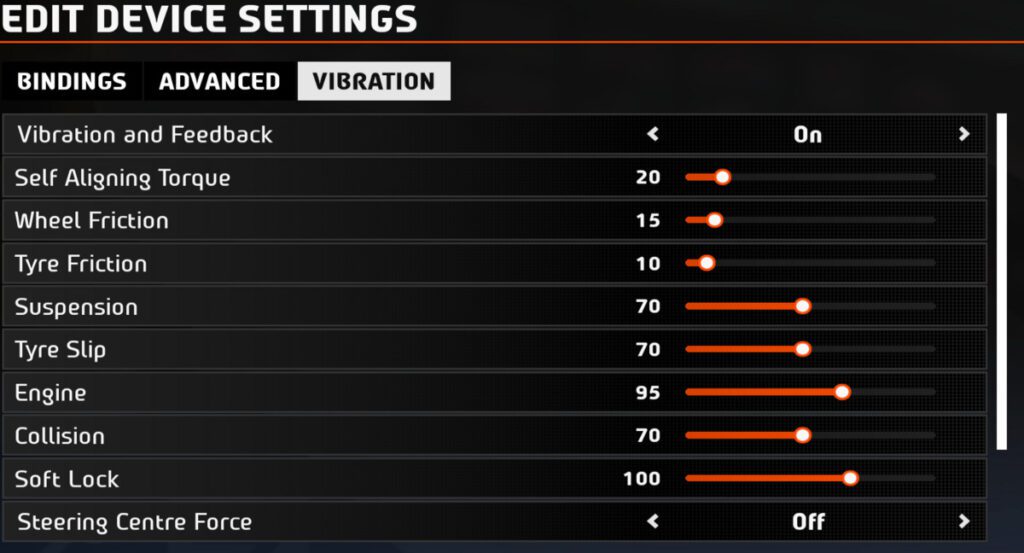
The EA Sports WRC settings menu isn’t labeled in an obvious way (you won’t see “Logitech preset”), so you’ve got sliders for different feedback channels. Most players settle into a configuration that gives strong, responsive feedback without swinging the wheel violently around:
• Self-Aligning Torque / Overall Force around 95-105 gives solid weight through corners without making the wheel too heavy.
• Wheel Friction low (0-15) keeps the wheel from feeling like you’re driving in molasses.
• Tyre Load somewhere mid (~20-30) helps feel changes in grip over gravel without drowning the car’s motion.
• Suspension / Tyre Slip turned up enough to feel rough surfaces and sliding, but not so high it becomes feedback chaos. Experienced players normally increase suspension and tyre slip sliders into the higher range of available values.
These numbers aren’t sacred, but they’re grounded in community-tested ranges that help prevent common problems like numb feedback or wheels that fight back unrealistically. Once you’ve dialled those in, test on a mixed surface stage to fine-tune.
A Modern Wheel Worth Considering
While Logitech wheels like the G920/G29/G923 still work and are supported in WRC, many racers are upgrading to more recent hardware for better fidelity and stronger motors. A great example of a newer wheel that’s becoming popular (and is compatible with PC/console rally games, including WRC titles) is the Thrustmaster T248R.
This is a mid-range wheel with adjustable force feedback levels and an LCD that shows real-time data like speed or current gear. It sits around the same price point as older mid-range wheels but has more modern feedback options and a robust pedal set included.
Players upgrading to wheels like this often report a more detailed feel through surface changes and vehicle load shifts compared to older dual-motor wheels. If you’re racing a lot and want rally stages to talk back in your hands, stepping up to something like the T248R can be worth it.
My Take as a Rally Player
Even with solid settings, you’ll want to tweak for how you feel the car. Some drivers prefer lighter feedback for long gravel sections so they can correct slides faster; others want heavier self-aligning torque for high-speed tarmac. If your wheel setup feels vague or fights you, don’t be afraid to lower a couple sliders and test again rally terrain varies wildly.
ALSO READ: WRC: Best Thrustmaster T300 RS Force Feedback Settings