 2 articles
Since the release of Space Engineers in 2013, many players have been reporting a bug causing their game to freeze for a couple of minutes. Though for many people the problem was caused by different variables, the fans were able to come up with a solution that works on almost every copy.
All thanks to the games modding community.
Fixing the Game Freeze bug in Space Engineers
In order to fix the problem, you’ll need a free dev tool released by the games creators, called Space Engineers Mod SDK. You can find it by opening your steam library and pressing checking the box next to the word “tools” in the “Games and Software” tab.
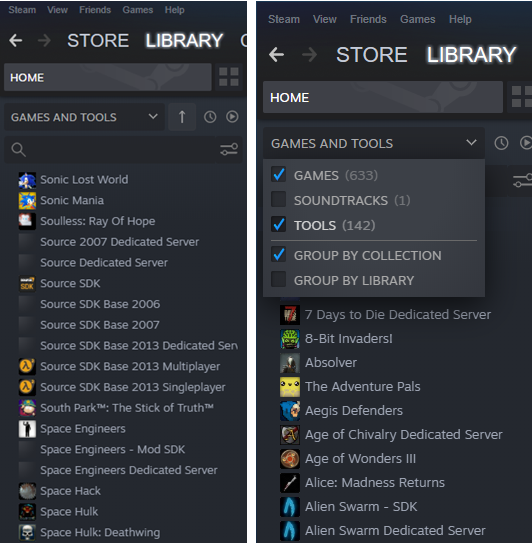
Next, you should be able to see the “Space Engineers Mod SDK” software underneath your game.
 Space Engineers: How to Find Cobalt Ore?Feb 17, 2022
Install it, open its folder and then open Bin64_Profile. Next, copy the VRage.Library.dll file, open the Space Engineer folder, find the Bin64 subfolder and paste the file there. When asked if you want to replace the already existing file, click yes. That should take care of most possible Game Freeze causes.
What if it doesn’t work?
If the problem still persists, you need to make sure everything concerning both your game and your PC is in order. Make sure you’ve got the newest drivers for your graphics card.
Try using Wired Connection instead of WiFi, if possible. Reinstall the DirectX. Make sure your firewall or antivirus does not block the game’s functions.
Triple check if you have everything updated. Unfortunately, with what the players know now, there are no more problems in the game that could be causing this bug. So, the issue might be directly tied to your PC or internet connection.
ALSO READ: Albion Online: How to Build on Island?