 40 articles
If you’re just starting Skate 4, you’ll probably get stuck with a black screen bug that you need to fix to leave the tutorial island. This isn’t a super common bug, but it is more common than it should be. It effectively softlocks you at the very beginning of the game, as it prevents you from reaching the main city. Nonetheless, we do have some potential fixes that might help you get past this bug.
How to Fix Black Screen and Leave the Tutorial Island | Skate 4
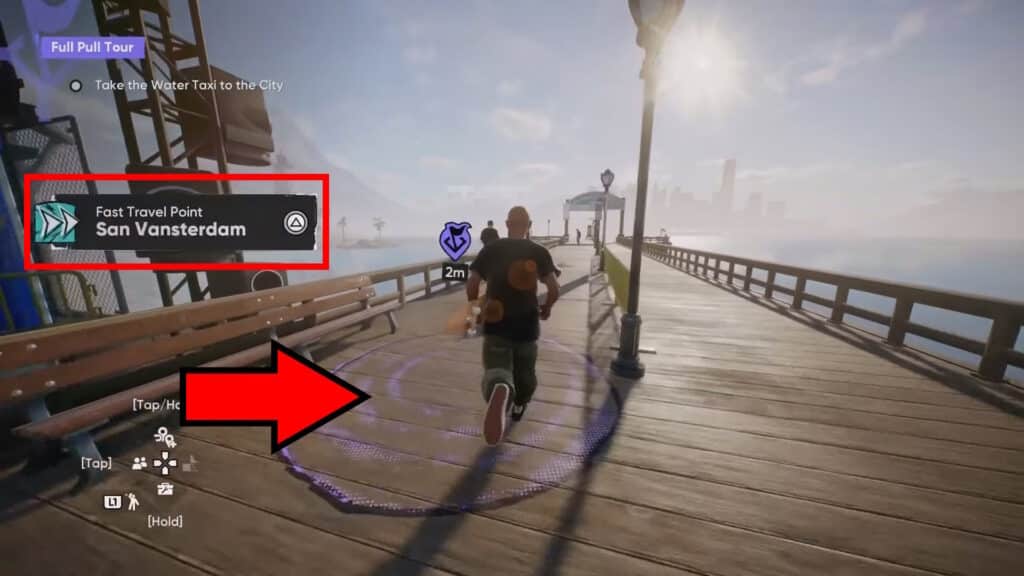
To leave the tutorial island, you just need to follow the in-game instructions. That means, find the purple circle marked above and stand on it. Shortly after, the game will give you a prompt to press Triangle (PlayStation) or Y (Xbox) to fast travel to San Vansterdam. Just press that button and you’re good! Well, more or less.
If the little purple circle isn’t there at all for you, try closing and relaunching the game. That should hopefully fix it.
This is where things get tricky! For a lot of players, the game now gets stuck on a black loading screen. If this happens to you, we recommend just letting the game sit on that screen for a while. Go do something else and just let it run for about 5 minutes or more, if possible.
 Skate 4: How to Get Tix & Level Up Skate PassOct 22, 2025
 How to Fly in Skate 4 (Glitch)Sep 30, 2025
 Skate 4 – Backwash Goals GuideSep 26, 2025
If you’re still stuck on that screen after more than 5 minutes, close the game and relaunch. Hopefully, the game managed to save during the loading screen. If it did, you will spawn in San Vansterdam, outside of the tutorial island. In this case, you’re all done! You’ve managed to avoid the black screen bug.
On the other hand, if you get this bug again, you might need to do a bit more troubleshooting. You can try letting the game sit on the loading screen for longer first, if you’d like.
Alternatively, you can try unlinking your current EA account. Then, either link your current account again or create a new account. This might reset you to the start of the tutorial, but it should also help get you unstuck from the tutorial island!
Sadly, that’s all we know about potential ways to fix the black screen bug and leave the tutorial island in Skate 4. If you still experience these softlock bugs at this point, you’ll need to wait for an official update and patch. There’s not much that players can do to fix things on their own in this case…