 11 articles
Paralives has modding built directly into the game rather than leaving it to third party sites and manual file management. Everything runs through the Steam Workshop which means installing community created mods is as simple as subscribing to them on Steam. No folder digging, no manual installs, no separate accounts on external sites.
On top of downloading existing mods, Paralives also has a built-in “Create New Mod” tool that lets you build and share your own content directly from within the game. In this guide, I will walk you through both sides of it so you can get started whether you want to install mods or make your own.
How to Create & Install Mods
To get started with installing mods, head to the main menu and click on “Mods“. It is the second last option in the menu just above “Exit”. This will take you straight into the mod menu.
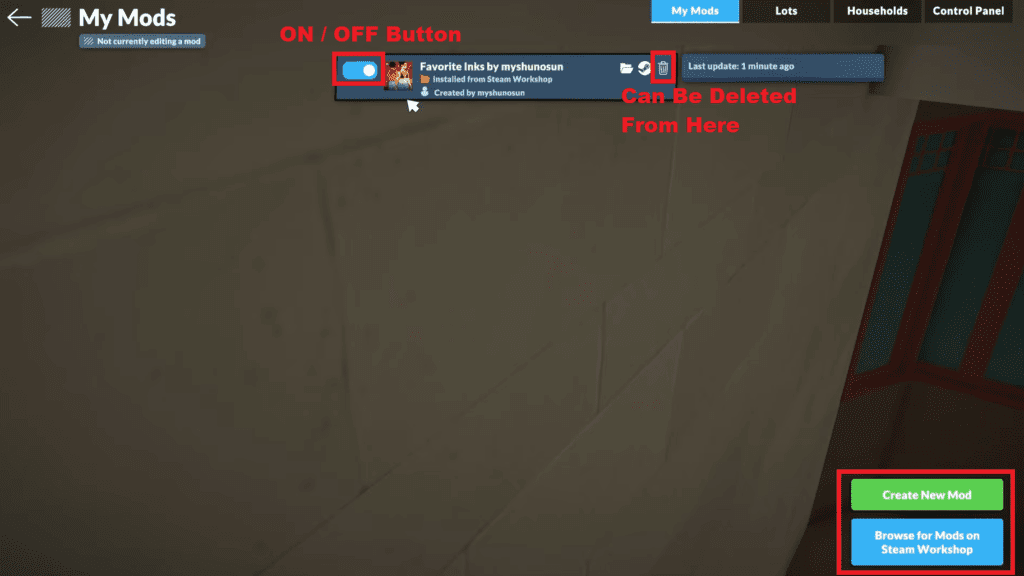
From there you will see a blue button labelled “Browse for Mods on Steam Workshop“. Click that and it will open up the Steam Workshop page for Paralives where you can browse through everything the community has uploaded.
 How to Unlock Hidden Item Catalog in ParalivesJun 12, 2026
 All Cheat Codes You Need to Know in ParalivesJun 10, 2026
 How to Try for a Baby in ParalivesJun 10, 2026
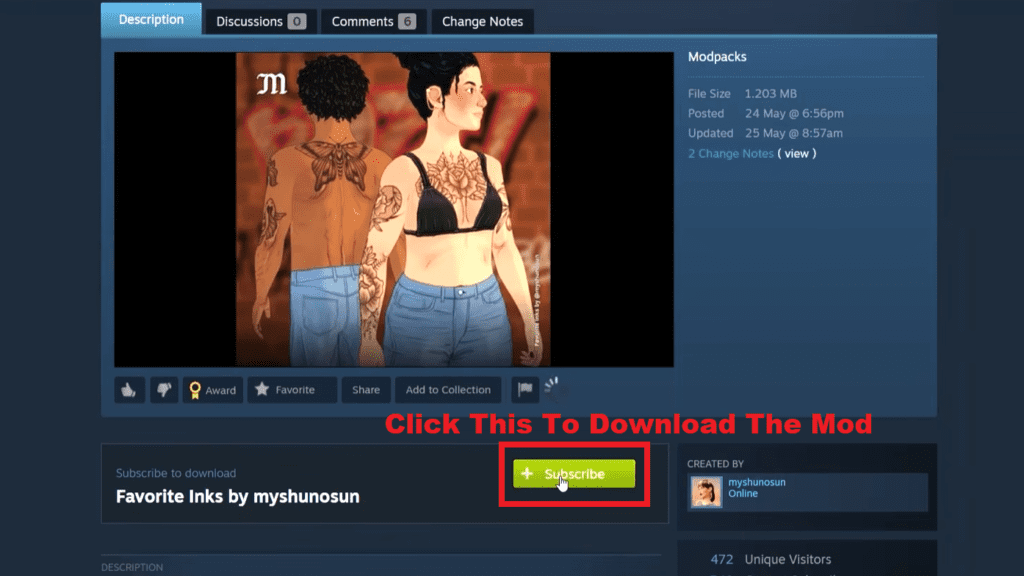
Once you find a mod you like, click on it to open its page and then hit the green “Subscribe” button. Steam will automatically download it and load it into the game.
Once you have subscribed to a mod it will show up in your in-game mod menu. To activate it, simply click the on/off toggle button next to it. If you want to remove a mod entirely, you can also delete it directly from the same menu without having to go back to Steam to unsubscribe.
It keeps everything in one place which makes managing your mods a lot more straightforward than in most other games.
Creating a Mod
Creating your own mod is done from the same mod menu. Look for the green “Create New Mod” button and click it. It will prompt you to give your mod a name. Once you have named it, the mod will appear in your mod list alongside any other mods you have installed.
Hover over your newly created mod and a green button labelled “Edit this Mod” will appear on top of it. Click that and the game will enter mod edit mode. Everything else in the mod list will grey out, so you know you are working exclusively on your mod.
From there head to the “Control Panel” tab which sits in the upper right corner of the mod menu. This is where all the actual editing happens. The Control Panel has a surprisingly large number of options covering pretty much every aspect of the game.
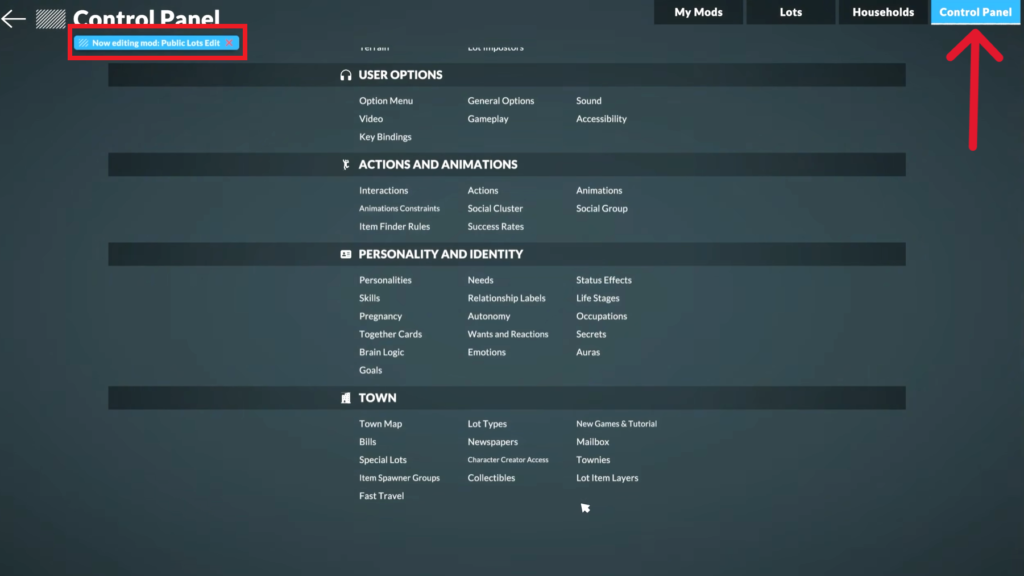
You can tweak things as broad as gameplay systems or as specific as how long a train waits at a stop, how fast tires get dirty, terrain settings or animation behavior. The level of control on offer is genuinely impressive and gives you enough room to create something that feels meaningfully different from the base game.
Once you are done tweaking everything in the Control Panel, head back to the mod menu. You will see a red button over your mod labelled “Stop Editing this Mod“. Click that to exit mod edit mode. After that, simply enable your mod using the toggle and jump into the game to see your changes in action.
That’s It
That covers everything you need to know about installing and creating mods in Paralives. The whole system is genuinely one of the better modding setups in any life sim to date. Installing community mods takes seconds and creating your own is accessible enough that you do not need any prior modding experience to get started. The Steam Workshop is already growing fast so it is worth checking back regularly as more content gets added.
On a side note, if the game is not running as smoothly as you would like, check out my guide on how to fix lag and get better FPS to get things sorted.