 11 articles
Paralives launched into Early Access and while it runs reasonably well on capable hardware, stuttering, lag spikes, and inconsistent frame rates are showing up for a lot of players right now. The settings menu is not the most extensive but there are still some meaningful adjustments worth making.
In this guide, I will walk you through every option available and help you squeeze the most performance out of your setup with what is there.
Best Settings For Getting Maximum FPS
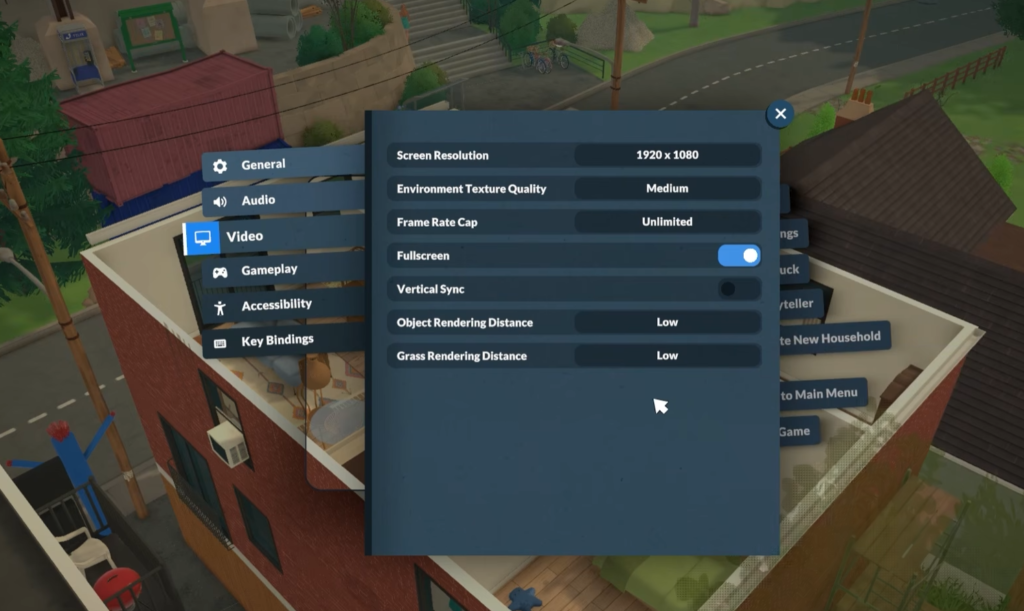
To get into the settings menu, click the three vertical dots in the top right corner of your screen or simply press ESC on your keyboard. This will pause the game, from there click on “Settings” and then navigate to the “Video” tab. Once you are in the Video tab, make the following changes:
- Set “Environment Texture Quality” to “Low” or “Medium” depending on how much your system is struggling.
- Set “Frame Rate Cap” to “60 Hz” to keep things stable and avoid unnecessary GPU strain.
- Make sure “Fullscreen” is checked and “Vertical Sync” is unchecked.
- Set “Object Rendering Distance” to “Low“.
- Finally, bring “Grass Rendering Distance” down to “Low” as well.
If you have made all the changes above and the game is still lagging or stuttering, the next step is to reduce the “Screen Resolution“. Drop it down one step at a time rather than going straight to the lowest option.
 How to Unlock Hidden Item Catalog in ParalivesJun 12, 2026
 All Cheat Codes You Need to Know in ParalivesJun 10, 2026
 How to Try for a Baby in ParalivesJun 10, 2026
It will make the image a bit softer and less sharp but it will give you a meaningful FPS boost in return. For most players this is the last resort option that finally smooths things out when nothing else has done enough on its own.
That’s It
That covers everything worth adjusting in Paralives right now. The settings menu is not the most extensive but hitting those key options makes a genuine difference to how the game feels. Things will likely improve as the game continues through Early Access and more updates roll out.
In the meantime, if you want to take some of the financial pressure off your Parafolks, check out my best money cheat commands guide.