 2 articles
While playing Shadow Warrior 2, you’ll quickly accumulate dozens of gems to upgrade your weapons. But how exactly do they work and how to get the best out of them? Well, that depends on the type of upgrade and the weapon you’re upgrading.
Upgrading Weapons in Shadow Warrior 2
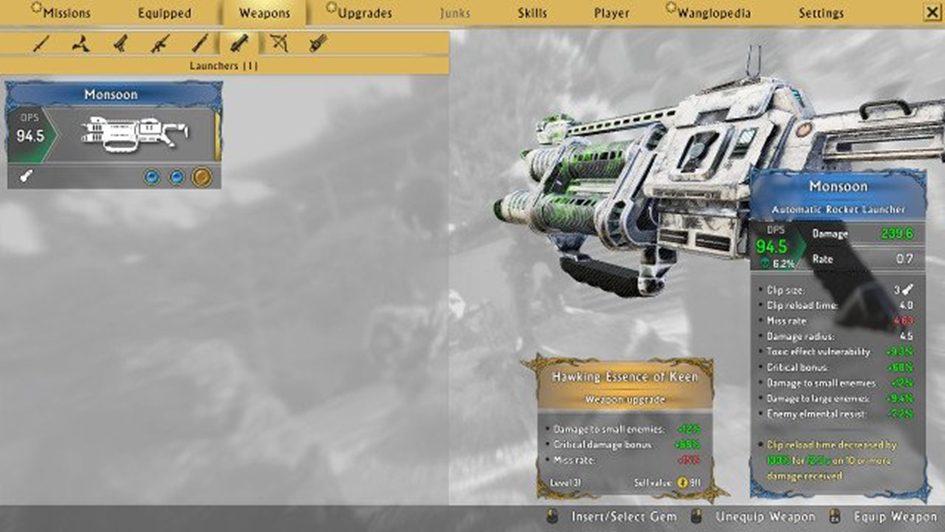
There are several types of weapons in Shadow Warrior 2
- swords
- short swords
- light firearms
- medium firearms
- projectile weapons
- special weapons
Each weapon has a different set of stats, so before you’ll choose which ones you want to upgrade, make sure it’s the best possible one of its type. In the “upgrades” menu, you’ll see all of your gems, classified in six categories weapons upgrades, fire modes, ammo upgrades, elemental upgrades, armor upgrades and amulets.
By default, they are sorted by level, but you can also sort them by rarity if you want.
 Shadow Warrior 2: How to Play Co-op/Multiplayer?Feb 26, 2022
Weapon Stats
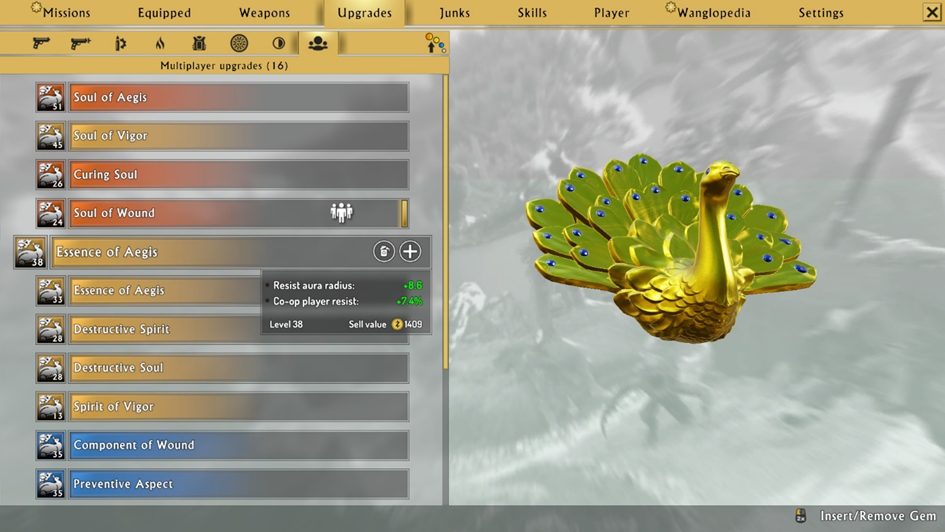
Back in the weapons tab, you’ll notice three round symbols under the weapons you’re browsing.
Clicking on these will bring out the selection of compatible upgrades you can insert into them. Now, keep in mind that armor upgrades and amulets impact the stats of your weapons even if they cannot be directly used to upgrade them.
On top of that, Fire Mode and Ammo Upgrades are only compatible with guns. Fire Modes change the way a certain gun fires, while Ammo Upgrades give special properties to the ammo used, such as making it explode on contact.
Elemental Upgrades bring in a light RPG mechanic to the table, as these can be helpful or harmful depending on the elemental affinity of your enemies. Also, don’t forget that the changes to weapon stats are shown in the bottom right portion of the screen.
Of course, with the sheer variety of possible upgrades, it’s hard to exactly say what will work for you. But don’t be afraid to experiment before you’ll find a perfect combination – you can always remove the upgrades from each weapon and use a different set up.