 118 articles
Whether you want to simply show off or set up trades, learning how to link an item in chat is pretty useful in Path of Exile 2.
This feature is as useful as it is obscured, though, particularly if you’re playing with a controller. Figuring out how to embed the item in your chat messages isn’t very intuitive, honestly.
Nevertheless, you have us here to help! We’ll quickly tell you everything you need to know to show any item you want with ease.
How to Link an Item in Chat | Path of Exile 2

The method to link an item in chat on Path of Exile 2 depends on whether you’re playing with a keyboard and mouse or controller. Of course, though, the first thing you need to do is to make sure you’re in the proper chat channel you want!
 Path of Exile 2 0.5: How to Craft +2 Projectile Skill GlovesJun 14, 2026
 Path of Exile 2 Return of the Ancients: Best Endgame Build Tier ListJun 10, 2026
 PoE 2 Return of the Ancients: How to Craft S-Tier ItemsJun 10, 2026
Anyway, if you’re playing with a keyboard and mouse, open up your inventory by pressing the I key. In the inventory, hover over the item you want to link in chat and hold the Ctrl and Alt keys then press Left Click. It should automatically link the item as an unsent chat message.
When playing with a controller, first open the inventory by pressing Options (Xbox) or the Touchpad (PlayStation). Then, press LT (Xbox) or L2 (PlayStation) to open the chat window. With the chat window open, hover over the item you want to link by using the right stick. Lastly, press X (Xbox) or Square (PlayStation) to add the link.
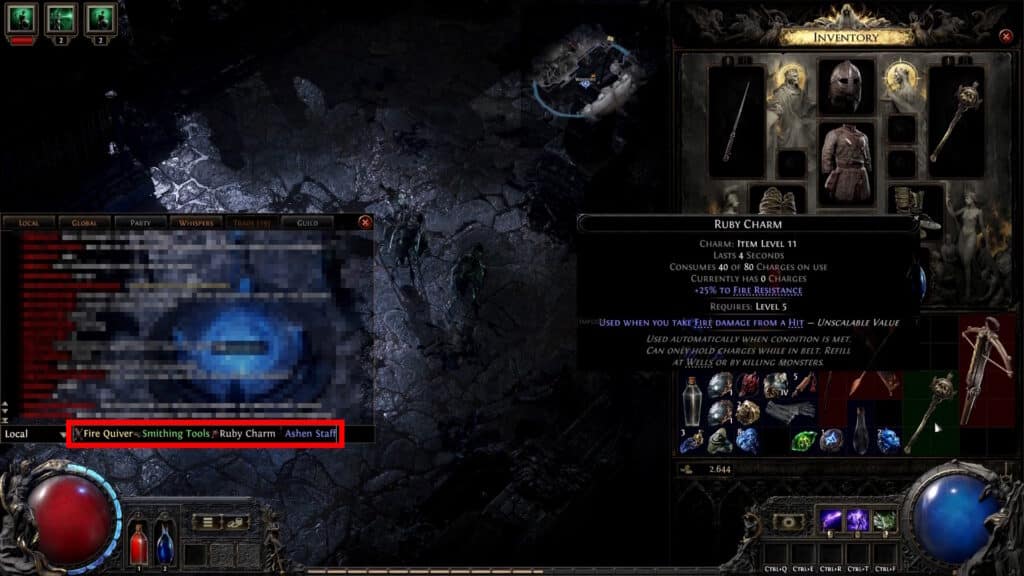
Do keep in mind that neither of these methods will automatically send the message with the linked items. This allows you to type anything you want along with the item in your message. You can even link multiple items at once if you feel like it! Just hit send once you’re ready to show off your sweet loot.
So there you have it, that’s everything you need to know to link an item in a chat message in Path of Exile 2. For more help with the game’s controls, check out our guide on how to switch to WASD movement or our guide on how set any skill binds with a controller.