 14 articles
In Cash Cleaner Simulator, you work as a launderer who has to clean money up for a bunch of shady people. Throughout the process, you will have to count the money to ensure that you are sending them the right amount. Doing so can be a tedious task, so here is how you can use a money counter to speed the process up and never have to do mental math ever again.
Cash Cleaner Simulator – How to Use Money Counter
Early in the game, you will gain access to the Black Market app in your smartphone. You will be using this a lot throughout your career, as this is where you can get a vast range of tools and machines to help boost your efficiency.
Among the tools you can buy early on is the money counter, which will cost just around 1200 dollars. There are various versions of this that you can buy as you level up, but focus on the lowest tier for now.
Buy just one of these as you should be fine with that single tool for quite a bit of time. Set it up on a surface where you can comfortably and quickly use it whenever needed. Having it close to the delivery point could be ideal.
 How to Turn On the Broken Switch in Cash Cleaner SimulatorMay 13, 2025
 Cash Cleaner Simulator – How to Dry MoneyMay 12, 2025
 How to Get Trash Bags in Cash Cleaner SimulatorMay 12, 2025
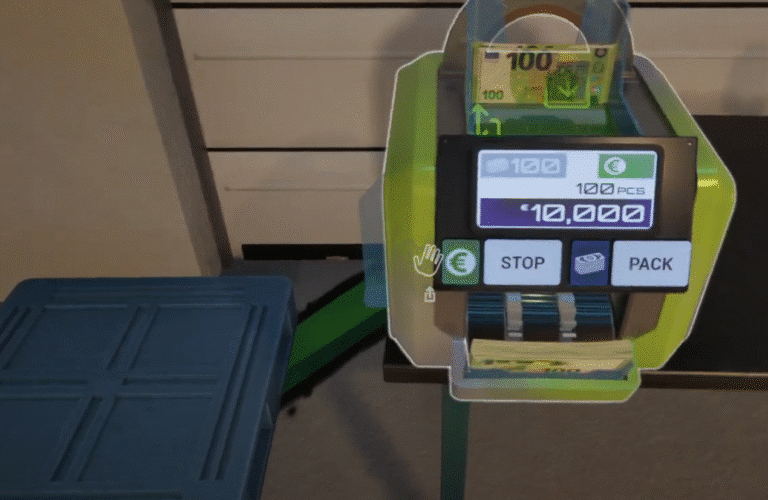
Now, while holding a bunch of cash, no matter the amount, all you have to do is drop it over the money counter. Once that is done, you just need to press the start button to have it count every single bill inserted into the machine.
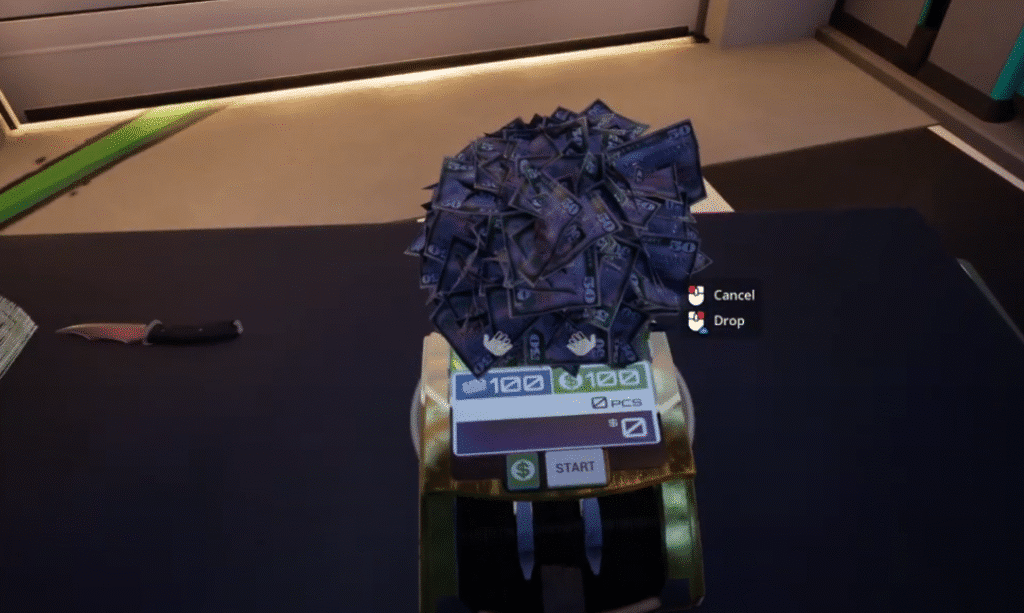
You can also tap different options on the machine so that it sorts bills depending on your settings, so play with the buttons to see how you can better streamline whatever job you are trying to do at the moment.
Once it is done counting a certain number of bills, you can pick it up and bundle up the cash on the side. The money counter will continue counting cash if there are still some left over in the machine.
That is pretty much everything you need to know in order to use the money counter, which should have been pretty obvious really. While you are here, check out our guide on how to store money in a mattress in Cash Cleaner Simulator so that you can discreetly send stuff to your clients after counting all the money!