 9 articles
As more Valorant players upgrade their systems to Windows 11, a good portion of them might encounter the error code VAN 1067. This error basically prevents them from logging into their Valorant accounts right after launching the game.
As annoying as this error is, there’s actually a quick fix you can do. Let’s find out what it is in this guide.
How to Fix Error Code VAN 1067 Fast in Valorant
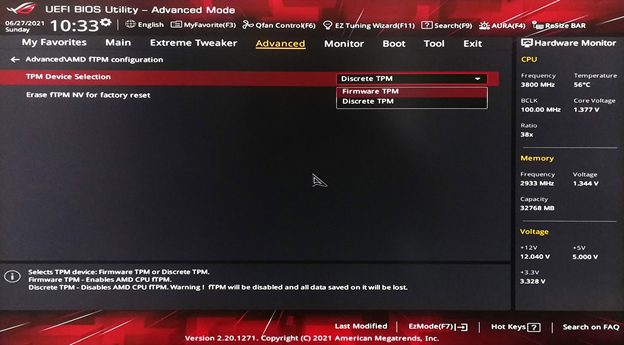
At first glance, the error might seem server-related, but it’s actually due to the TPM 2.0 (Trusted Platform Module). This happens when players didn’t enable TPM 2.0 on their systems. In most cases, TPM 2.0 updates alongside the Windows 11 installation. However, there are cases where players need to turn it manually.
Here are the steps you need to follow to do so:
 How to Copy Crosshair in ValorantApr 7, 2023
 How to Change Shotgun Crosshair in ValorantApr 6, 2023
 Valorant: Ultimate Viper Guide On PearlJun 30, 2022
- Check your BIOS hotkey. If you don’t know the hotkey, you can search it on Google using the model of your motherboard alongside the words “BIOS hotkey”.
- Restart your computer, and as soon as it boots, keep on spamming your BIOS hotkey to enter the BIOS.
- In the BIOS settings, head over to the Security tab.
- Inside the Security tab, look for the TPM option and enable it.
- Make sure to save the changes before you exit the BIOS.
- Wait for your computer to boot, and try logging into your Valorant account to see if it fixed the issue.
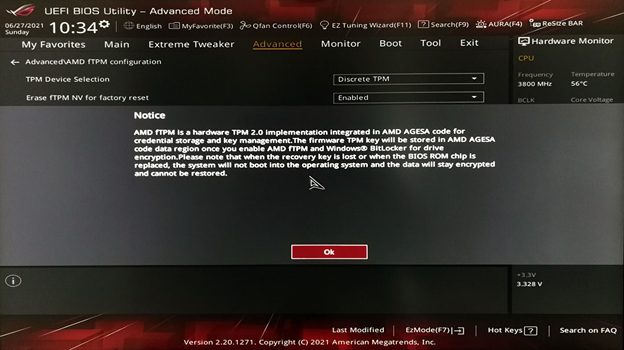
In the worst case scenario that this fix didn’t do anything, your next best option would be to downgrade to Windows 10. This way, you can continue playing Valorant without having to deal with this annoying TPM issue.