 24 articles
Lag spikes are a fairly common occurrence in Call of Duty: Black Ops 7, but there are things you can do to try to alleviate the issue.
Mainly, there is a setting that causes the game to stream assets during gameplay. This can consume your bandwidth, causing lag spikes and the Packet Burst error to pop up. In such a fast-paced game, that can quickly mean trouble!
Thankfully, there’s a potential way to fix this, which is what we’re going to tell you about.
How to Fix Lag Spikes | Call of Duty: Black Ops 7
For a lot of players, the lag spikes in Black Ops 7 are mainly caused by the game downloading textures during gameplay. This can’t be disabled entirely, sadly, but it can be minimized to lower its impact!
 Black Ops 7 Zombies: Free Ray Gun World At War Easter Egg GuideJun 28, 2026
 Black Ops 7 Zombies: Secret Takeo Easter Egg Guide | Reunion Dark OpsJun 28, 2026
 Black Ops 7 Zombies: Nekomancer Wonder Weapon Guide (Kowakujo) All Correct StepsJun 27, 2026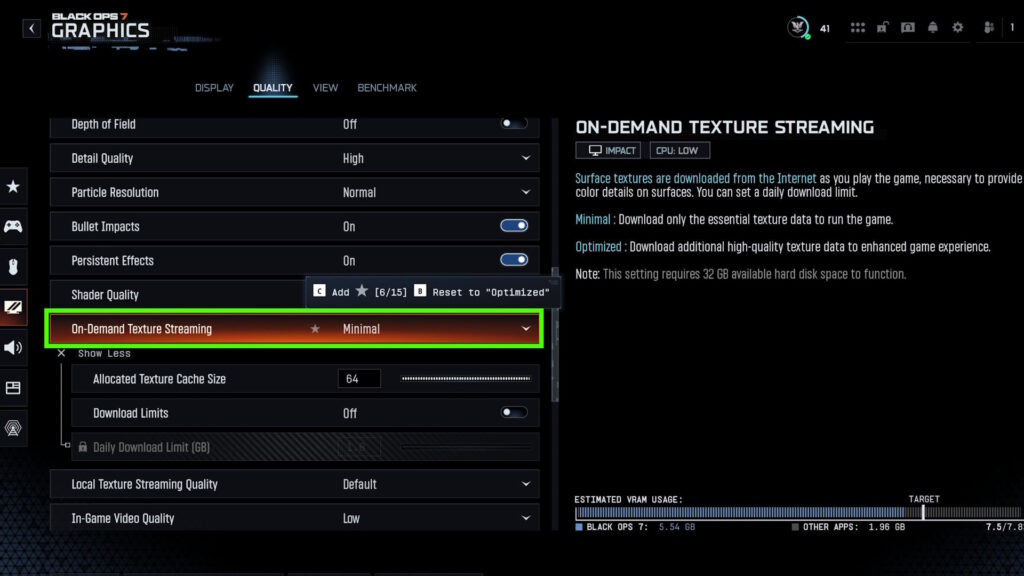
To do that, you’ll need to go into the Quality tab under Graphics settings. Scroll down there and you’ll find On-Demand Texture Streaming under the Details & Textures section. You want to set it to Minimal.
Additionally, you can also click on Show More or press Square (PlayStation) or X (Xbox) to show more options. This will also allow you to increase the Allocated Texture Cache Size.
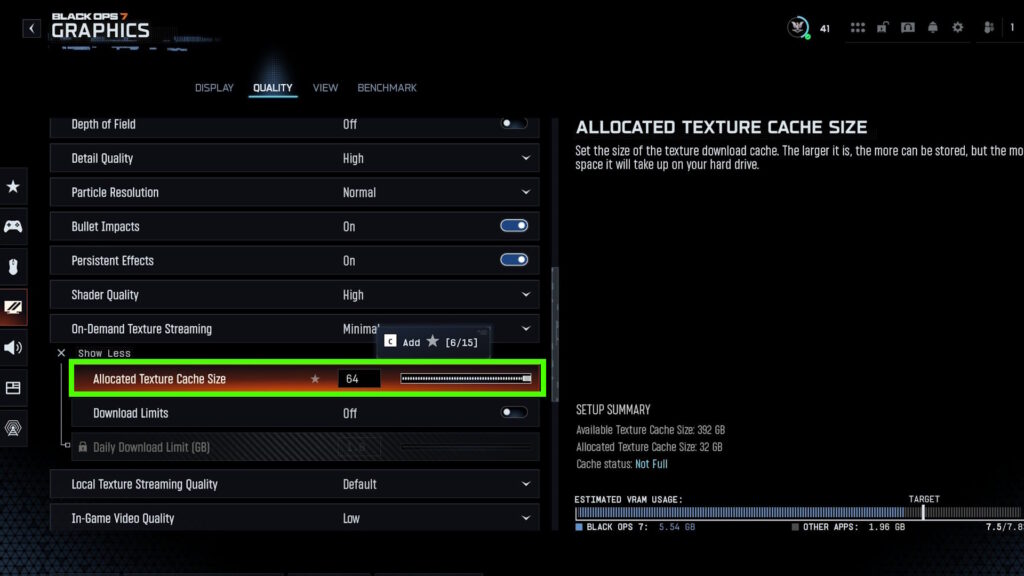
It’s recommended to increase the Allocated Texture Cache Size as much as possible. This will require more free space on your drive, but it will reduce how much the game downloads textures while playing.
Sadly, though, there’s no way to completely opt out of using On-Demand Texture Streaming. Nonetheless, minimizing it should at least alleviate lag spikes in this game.
If you still have issues, we recommend making sure that it’s not something with your connection. Stop any other downloads you have and close apps that are likely to use your internet connection during gameplay. Also disable automatic screenshot and recording uploads on your console, if you have it on.
It’s also a good idea to try playing other online games, just to test. If you have no issues in other games, then the issue is with Black Ops 7 itself. But sadly, there would be nothing more you can do if you already use the recommended settings above.
Nonetheless, we hope this at least helped you reduce the lag spikes in Black Ops 7. We know how frustrating it can be to deal with lag issues in a fast-paced multiplayer game…