 5 articles
In order to train your pets to do some cool tricks, you will have to own the “Sims 4: Cats & Dogs” expansion pack first. If you already have it, read on and let’s dive right into it!
How To Train Dogs (Sit, Speak, Shake Hand & More) – Sims 4
Assuming that you already have the dog you want to train, you should start the process by clicking on him, then select ‘More Choices’ and then select ‘Training’. After that, you should see a handful of actions such as but not exclusive to: speak, fetch, heel, sit, shake, etc. (image below).
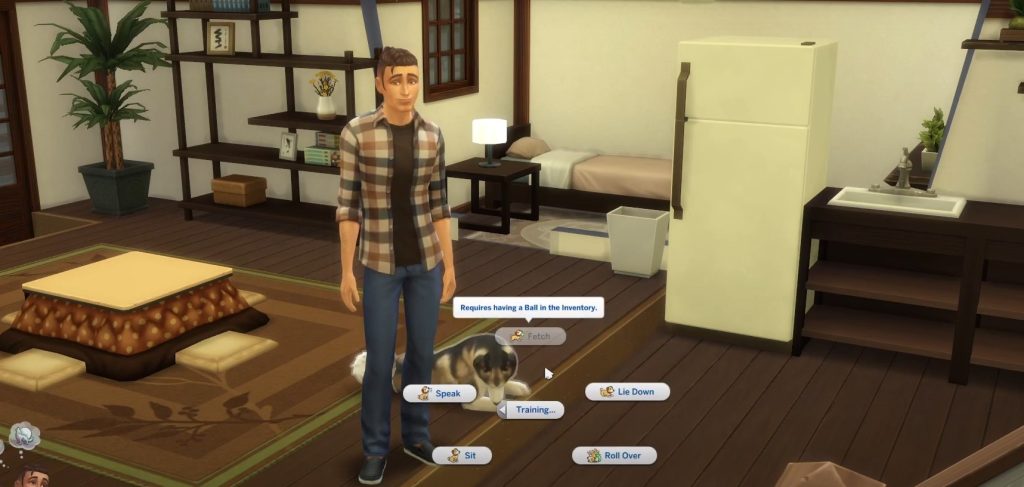
Simply pick an action you would like to teach your dog and wait for it to perform said action. There’s a good chance your dog’s going to refuse to do anything and just ignore you, or mess up the action. This is completely normal. All you have to do is repeat the action – just keep selecting that same one until the dog eventually performs it successfully.
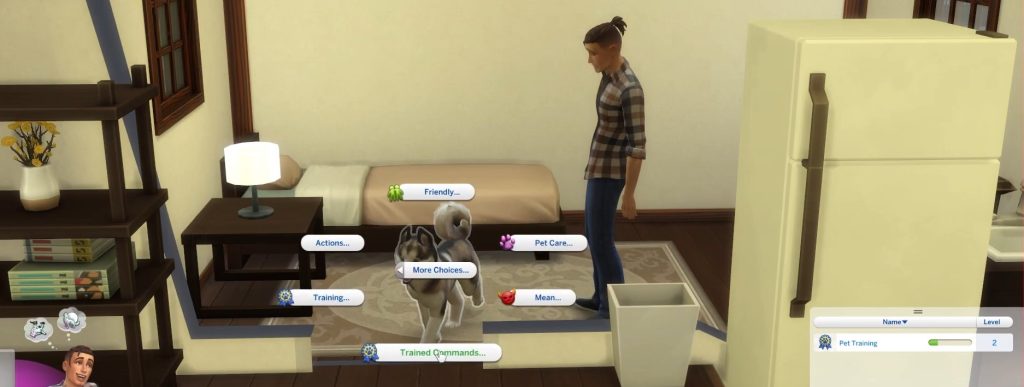
Additionally, you can teach your dog not to do certain things: play in puddles, whine for food, attack, etc.
 Sims 4: Complete Knitting Skill GuideJan 6, 2023
 Sims 4: How to Furnish a House | Basic Building GuideMar 23, 2023
 The Sims 4: Best Werewolf Abilities | Explained And RatedJun 28, 2022
To do this, you must wait for the dog to perform aforementioned actions, at which point you should click on him and select ‘Lecture About’. Again, you may need to repeat this process a couple of times in order for the dog to learn it but once it does, you won’t ever have to repeat it again.