148 articles
Palworld is an upcoming online game that will allow players to play alongside their friends and other players online.
Nowadays with games releasing over different platforms, crossplay has become very important for a lot of people. Player always want to know if they can play with their friends across different gaming platforms.
Knowing how the servers work is also something many players will want to know about. How can you setup your own server, and how will it work?
This article will answer both of these questions. We will look at crossplay availability, and setting up your server in Palworld.
 Palworld Feybreak: How to Use Labor Research LaboratoryDec 30, 2024
 How to Get Your Own Bounty Officer in Palworld FeybreakDec 30, 2024
 Palworld Feybreak: New Breeding Combos (New Pals)Dec 30, 2024
Crossplay and Progress Across Servers

Crossplay
Palworld will be available to play on the Xbox and PC. Unfortunately, the game will not support crossplay between those 2 platforms. Your progress on the Xbox and PC will be completely different.
Even though it won’t be available on release, crossplay is something Pocketpair are working on currently. Fans of the game will be hoping this is something that happens very soon.
You learn all about crossplay from our other guide that focuses on crossplay features in Palworld.
Progress Across Servers
Progress across 2 different servers, even on the same platform, will not carry over. Everything in Palworld is saved server side. This means that anything you do in the game will be automatically saved on the game servers.
This protects players from any local data loss that might occur. It’s important that players log off from the game properly to ensure their data doesn’t get corrupted.
Server Setup Guide
Through Pocketpair’s official Discord, we know that Palworld will allow players to create and host their own server in the game.
Creating a server in a game is a simple process and not that hard. We can expect it to be the same in Palworld. Additionally, Pocketpair has also said that all the resources you will need to host a server will be provided by them.
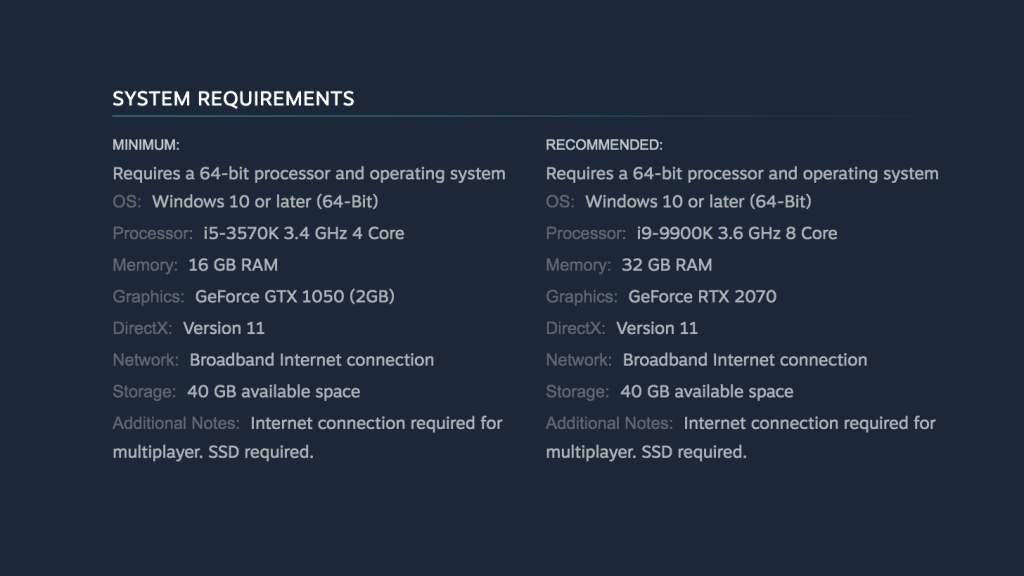
The exact requirements for hosting a server are not available, but we can assume they will fall within the game requirements available on Palworld’s official Steam page.
Private Servers in Palworld
The servers you create and host in Palworld will be private, with the host having control of the server. Private servers in Palworld will allow players to play in more dedicated servers with more controlled player counts. The maximum player count for private servers is 32 for now.
You will also be able to join other people’s private servers if they are open. It’s important to remember that a lot of these servers will have their own rules set by the host. Not following these rules might get you kicked from these servers.
Dedicated Public Servers

Palworld will also allow players to play in the dedicated servers hosted by the game. These servers will be public, and anyone can access them.
Players can play with up to 3 more friends on these servers by creating a party before joining the server.
ALSO READ: Important Things to Do First in Palworld