7 articles
Xbox Game Pass is a monthly subscription service which offers you with a catalog of over 100 games which you can play for free. Plus, you also get access to games on day one if they are a part of the Game Pass.
However, when subscribing to the Xbox Game Pass, you may come across a well-known issue which is the inability to change the Country/Region to the correct one. The option is just grayed out and you can’t seem to do anything about it. This post will give you a simple solution to this problem which you can implement in under 2 minutes.
Solution for Fixing the Grayed Out Country/Region Option
Let’s get straight to the point, the first thing you want to do is open the start menu of your Windows. Once you do, type in “Region Settings” and then click on Region settings from the search result. Refer to the image down below in case of confusion.

Once you do that, a window will pop up like the one shown in the image below. On top of this window, you will find an option to change your Country or region. It is marked in the image below.
 Cloud Gaming Up 45% on Xbox Game Pass Amid DRAM Price Crisis Due to AI BoomNov 26, 2025
 Microsoft Announces its Lineup of Games for October a Week After the Controversial Xbox Game Pass Price HikeOct 8, 2025
 Microsoft Removed Xbox Game Pass Discounts, Replaced Them with Rewards Points InsteadOct 6, 2025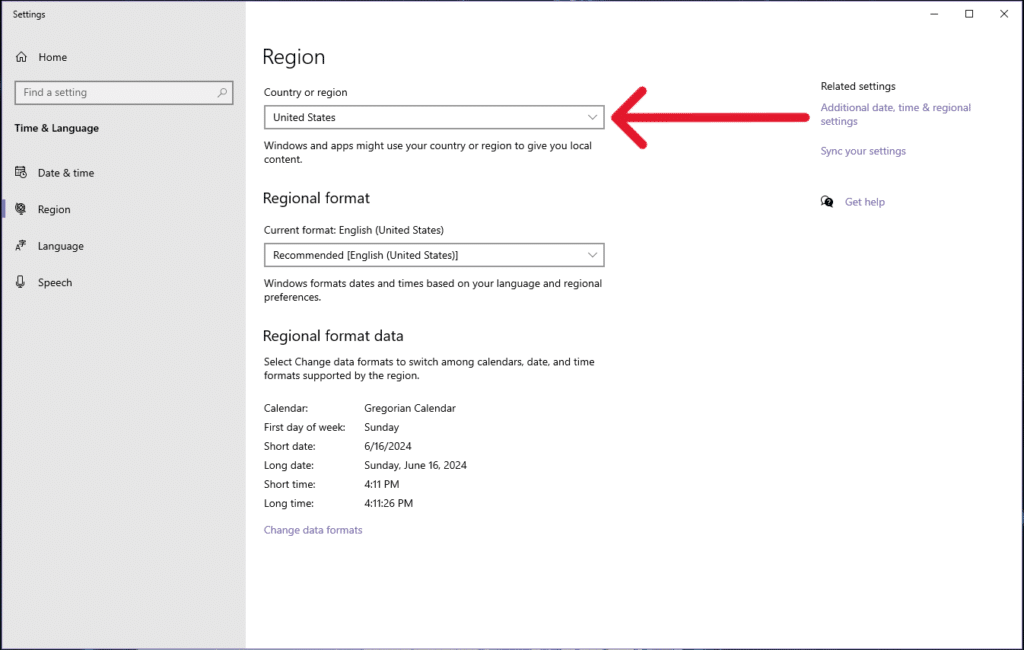
Click on it and then change it to your own country. Once you have done that, log out of your Xbox Account and then log back in. Now, your problem should be solved and you will be able to subscribe to the Xbox Game Pass without any hassles.
NOTE: You must be logged in on Windows with the same account that you want to use for the game pass! Alternatively, you can change your region through your Microsoft account settings. Check out this official Microsoft guide on changing region.
The recent Xbox Games Showcase 2024 was a blast. And if you are interested in knowing which games will be available as a part of the Xbox Game Pass, then give this guide a quick read: Does Xbox Game Pass Include All Games From The Xbox Games Showcase 2024? You will be surprised by the list of games which you will be able to play for free!