 24 articles
MultiVersus is a fighting platform game where you can play any character from the Warner Bros Universe and battle it against other players worldwide. But playing with your friend face-to-face is also fun and engaging, and MultiVersus has this option. We will show you how to play multiplayer co-op locally.
How to Play Local Multiplayer Co-Op
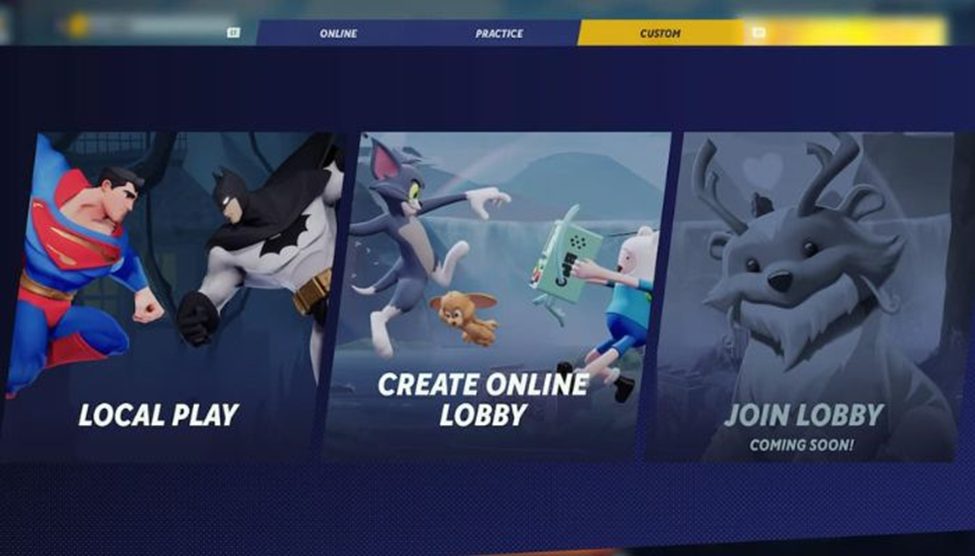
Multiversus is a newly launched fighting platform game with online and local modes. Online you can fight in game modes in 1 VS 1, 2 VS 2, or TEAMS, Co-Op VS AI and Free for All (FFA) with other players around the world. You can also play locally with your friends in MultiVersus.
Setting Up Local Multiplayer Co-Op
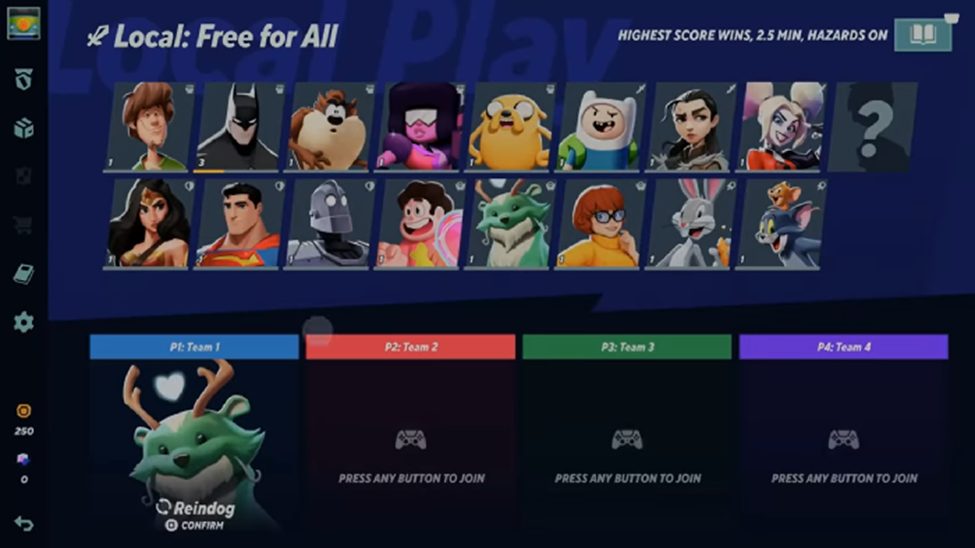
To play Multiplayer Co-Op locally, press the play button in the main menu. Next is to select the custom button and pick Local Play.
To play against your friend locally, you need another controller for it to work. It will then bring you to the character selection window, where you will press any button to open player 2, allowing you to play locally.
 MultiVersus: How to Make Money Fast | How to Unlock All CharactersMar 22, 2023
 MultiVersus: Big Buffs and Nerfs Coming With the Latest UpdateJan 21, 2026
 MultiVersus: Movement and Recovery GuideAug 5, 2022
You can configure the settings or game mode you will play by clicking on the open book icon on the upper right corner of the game.
In the match settings, you can set the game mode to 1 VS 1, 2 VS 2, or FFA. You can also configure other features, such as the duration for each battle and enabling or disabling hazards.