118 articles
Fast-traveling in Enshrouded is of immense importance in this game. Not only is the world you are in enormous. It is also time-consuming to manually go from one end to the other. That is where fast traveling comes into play.
The developers of this recently released survival RPG made some clever choices and added cool features to the game.
One such feature is the ability to create your own fast-travel points. This means that in practice, you can fast-travel from almost anywhere on the map. In today’s article, learn how to create your own fast-travel points and use them effectively. Let’s begin!
How to Create Your Own Fast Travel Point

Why even bother with fast traveling in this survival game you may ask. One logical reason, which comes to mind instantly, is that if you are building your base, and you forget something, you can easily go back, pick up the item/s you need, and jump straight back to building for example.
 Best Secret Golden Chest Farming Locations in Enshrouded Water UpdateDec 6, 2025
 Best Base Locations in Enshrouded Wake of the WaterDec 6, 2025
 Enshrouded: Best Builds After Update 7 (Wake of the Water)Dec 3, 2025
There are many uses for fast traveling and most of them are for the player’s convenience and maximum enjoyment of the game.
Make an Altar
Altars are key for fast traveling. Press the V-key to open up the building menu and select the Altar. In order to construct this Flame Altar, you will need 5 Stone in your inventory. A reasonable amount and quite easy to get.
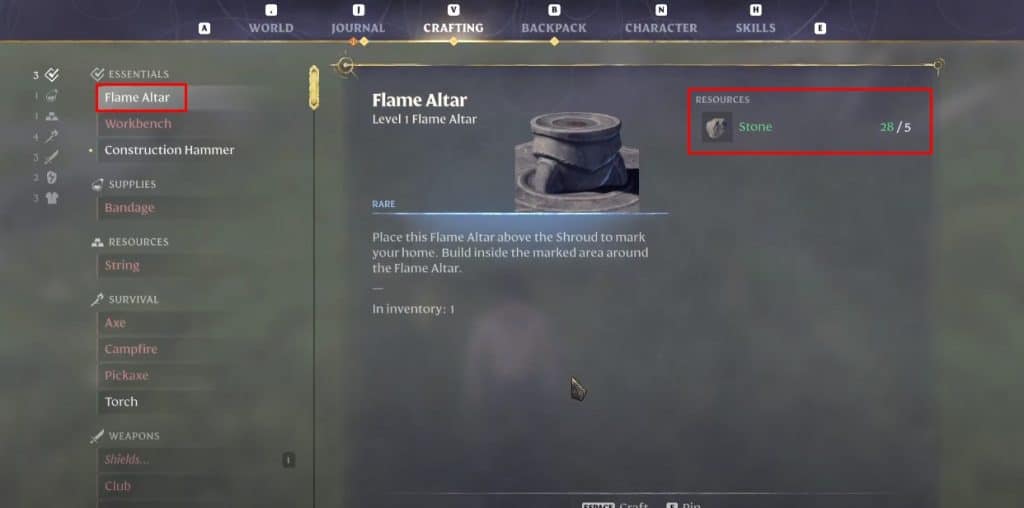
Once you do this, simply place the Flame Altar on the ground where you want your fast travel point to be, and voila! It is done. You have successfully created your own custom fast-travel location.
Do note that you can always fast travel to your base. It is one of the key elements of the game.
In case you ever want to remove the fast travel point you constructed, simply select the Flame Altar and click the “Extinguish Flame” button.
ALSO READ: How to Host a Multiplayer Game in Enshrouded