118 articles
Enshrouded was released only recently and it’s already making headlines. This open-world, survival RPG brings revolutionary content to the gaming industry and is already transforming the market.
In addition to this, Enshrouded developers made it possible for players to play this game together with their friends! That is, to Host Enshrouded on a server for players to join in and have fun.
In today’s article, we will be covering just this. Dive in as we explore the topic of how to host a multiplayer game in Enshrouded and thus be able to play together with your friends no matter where they are. Let’s get started!
How to Host a Multiplayer Game
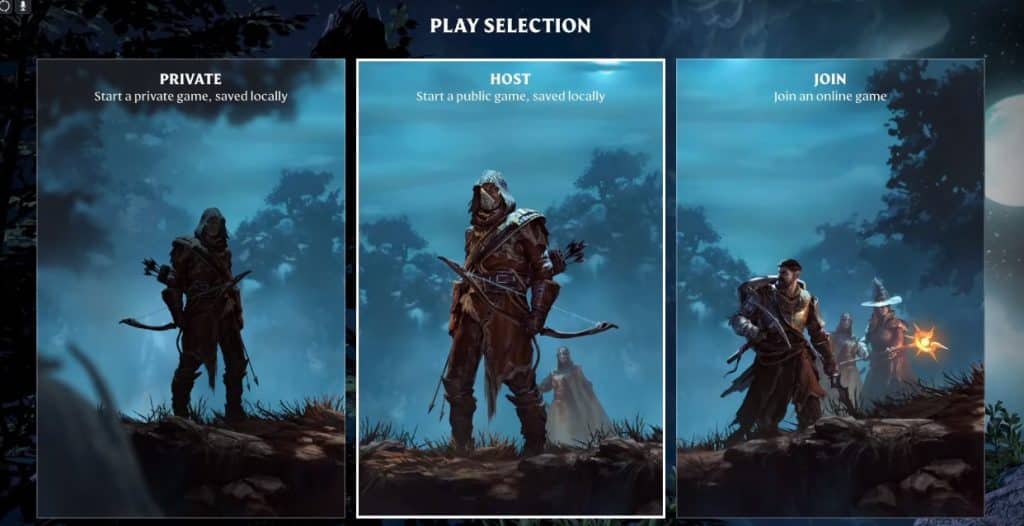
To start off this guide, you will need to click the “Play” option in the main menu. This will prompt you to select a game mode. There are 3 options you can choose from:
 Best Secret Golden Chest Farming Locations in Enshrouded Water UpdateDec 6, 2025
 Best Base Locations in Enshrouded Wake of the WaterDec 6, 2025
 Enshrouded: Best Builds After Update 7 (Wake of the Water)Dec 3, 2025
- Private – to start a private game. Saved locally meaning on your Hard Drive.
- Host – to start a public game, saved locally as well.
- Join – join an online game.
Each option has its respective advantages and disadvantages but we will explore that another time.
For now, head over to the “Host” option and click on it. This will then take you to the game settings menu. Here you can set a password for your server (if you want to, it is not necessary), adjust server visibility, and limit the number of players that are able to join in.
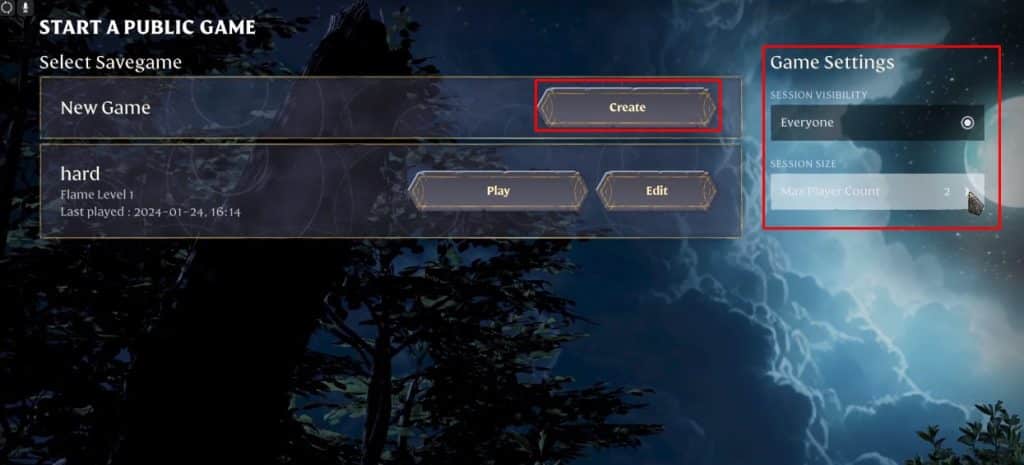
Once you’ve set up your game accordingly, click Create and wait for your friends to join. Have fun and remember, being toxic never pays off!
Do note that in order to join your game, your friends must select the “Join” option in the selection menu as you are the one hosting the game in this case.
ALSO READ: Enshrouded: How to Auto Sort Inventory