162 articles
ARC Raiders is finally out, and you’ll want the best settings for max FPS and optimization so you can be on even footing against the ARCs and other players!
Frankly, though, the game doesn’t really give you a lot of settings to tinker with. Nonetheless, that doesn’t mean that you can’t try to improve things…
In this quick guide, we’ll give you our list of recommended settings for the best performance and clarity.
Max FPS & Best Settings | ARC Raiders: Optimization Guide
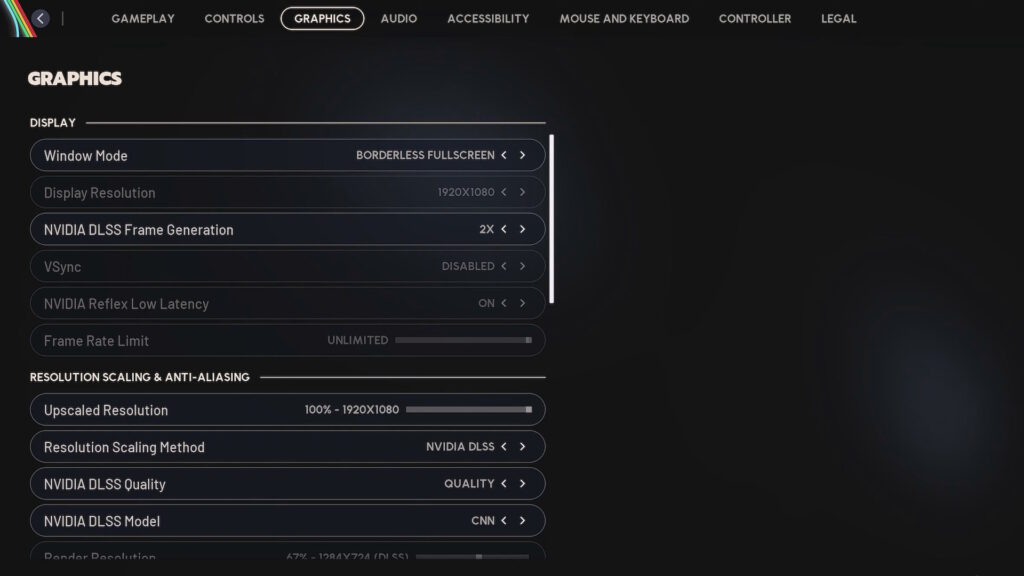
When it comes to the performance-related settings in ARC Raiders, they’re all located within the Graphics tab of the settings menu. Conveniently, they’re all in one place together! So, let’s go from top to bottom with our recommendations:
 Hotel Panorama Puzzle Solution in ARC RaidersApr 30, 2026
 ARC Raiders: How to Find & Use Dockmaster’s DetectorApr 30, 2026
 ARC Raiders: Where to Find Turbine CompressorApr 30, 2026
Window Mode – Borderless Fullscreen. Officially recommended.
DLSS/FSR Frame Generation – Disabled. Enabling it can improve visual smoothness, but it adds noticeable input latency in most cases.
NVIDIA Reflex Low Latency/AMD Anti-Lag 2 – On.
Frame Rate Limit – Unlimited.
Resolution Scaling Method – Depends on your GPU. For NVIDIA users, DLSS is the optimal choice. For other users, AMD FSR 3 is generally the best choice, but Intel XeSS can work well too.
DLSS/FSR/XeSS Quality – Quality. You can also try Balanced for some extra performance at the cost of visuals. Anything lower, though, is not recommended.
NVIDIA DLSS Model – Transformer.
Field of View – 70. Raising it can allow you to see more around you, but it has a major performance impact. Lower is not recommended.
Motion Blur – Off.
NVIDIA RTX Global Illumination – Static.
View Distance – Medium. Low is not recommended as it can affect gameplay.
Anti-Aliasing – Low.
Shadows – High. Keeping this on high is important, as it’ll draw more shadows. This can help you spot enemies or ARCs. Only lower this setting if you really need extra performance.
Post-Processing – Low. Besides performance, this also minimizes visual effects that impact clarity.
Texture – Depends on your GPU’s VRAM. Epic for 8GB+, High for 6GB, Medium for 4GB, and Low for below 4GB.
Effects – Low.
Reflections – Low.
Foliage – Low. Better performance and also provides more clarity by removing some bushes players could use to hide on higher settings.
Global Illumination Resolution – Low.
That’s all of the settings that affect performance in ARC Raiders and our recommendations for optimization and max FPS! Admittedly, the game doesn’t offer a lot of settings to tinker with, but we hope this helps you get better performance.