 17 articles
Even after 5 years since its launch in 2019, Apex Legends remains one of the most popular MMO first-person shooters on the market at the moment.
This battle-royale, free-to-play game offers a lot of different content in terms of customization, immersion, game modes, and more. However, there are still some issues surrounding the Apex Legends servers.
Namely, players are sometimes unable to find a match. This could be down to the fact that players often pick the wrong server to play on.
That is why in today’s article, we’ll give you a step-by-step guide on how to change your server and/or region to avoid any such inconveniences. Let’s get to it!
 Best Apex Legends Settings for Season 29 (Visibility/FPS)May 23, 2026
 Apex Legends: How to Play and Master Axle (Skills, Passives, Tips)May 9, 2026
 How to Fix Apex Legends Error Code 30005Dec 20, 2023
Launch the Game/Admin Rights
When launching the game, it is important to make sure you launch it with administrator rights. Sometimes this is all it takes to resolve the issue of “No Server Found” due to your firewall blocking the connection.
To do this, simply right-click on the Apex Legends icon and click “Run as Administrator”.
Main Menu Options
In the main menu of the game, you will see several options listed. These are “Exit to Desktop”, “Data Center”, and “Accessibility Options”. You need to hit Tab to open the Data Center which are your servers in the most basic of terms.
Here you will see all of the available servers listed and their respective pings. Select the server with the lowest ping and try it out for yourself. Or if you want to be a toxic member of the community, choose the highest ping and rock on!
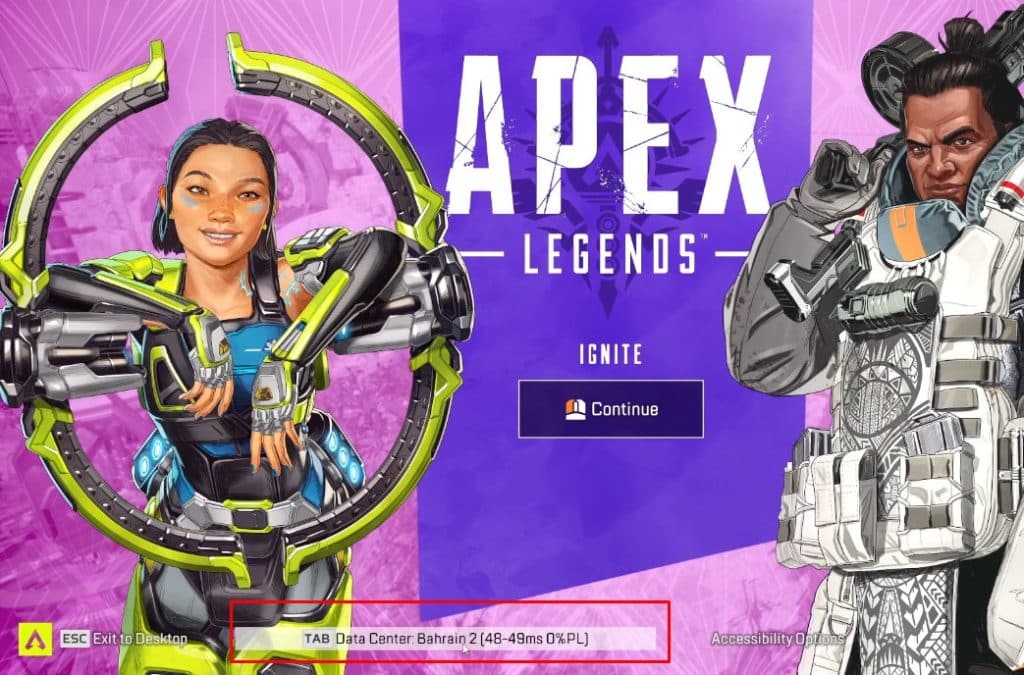
Do keep in mind that other players will hate you for it, so just something to keep in mind. Apex Legends lobbies are similar to most other multiplayer shooters out there. Have fun!
ALSO READ: Tekken 8: How to Pick Your Main Character?