 22 articles
Call of Duty: Modern Warfare 2 has finally released its beta version 2 weeks ago, allowing players to access the game in its early stages. Unfortunately, it’s already been plagued by cheaters and hackers who ruin the experience for most players.
If you are one of those players, then you have the option to block and even report them for a ban. Let’s find out how you can do that in this guide.
How to Block and Report Players in COD Modern Warfare 2
Unfortunately, the game’s anti-cheat system isn’t that effective in getting rid of all those cheaters and hackers. However, you can help them expedite the process by reporting players who you believe are using cheats and hacks.
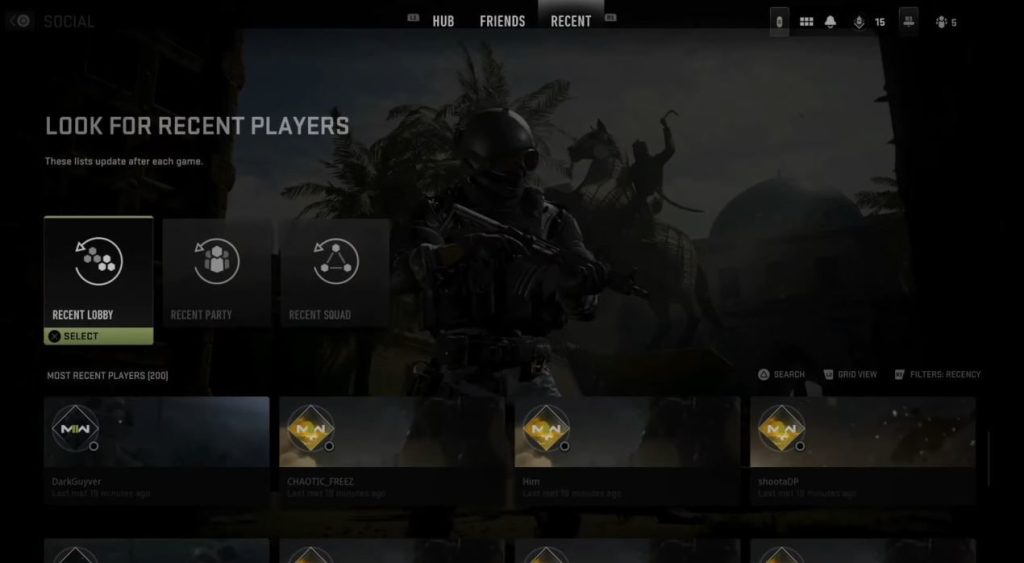
At the same time, you can just block a player you don’t like playing with, and that player will no longer appear with you in the lobby. To do so, all you need is to open your menu and head over to the Social Tab. There, at the top navigation bar, head over to the Recent tab. Here, you’ll find a list of players whom you have played with recently.
 Modern Warfare 2: How to Unlock All Season 3 Weapons FastMay 13, 2023
 How to Get a Free Medic Vest in CoD DMZApr 23, 2023
 MW2 DMZ: Where to Find 3 Scavenger Calling CardsApr 21, 2023
You will then find three options to choose from. Either find a player in a Recent Lobby, Recent Party, or Recent Squad. For this example, we’re just going to go for Recent Lobby as the player you want to block is someone you just met in the lobby.
Choose the option, and it will then show you a list of the most recent players you were with in the same lobby. Then, select the player you want to block, and in his profile, look for the Block and Report option. You can then choose the Block Player option if you want to block that player and prevent him from reappearing in a lobby with you.
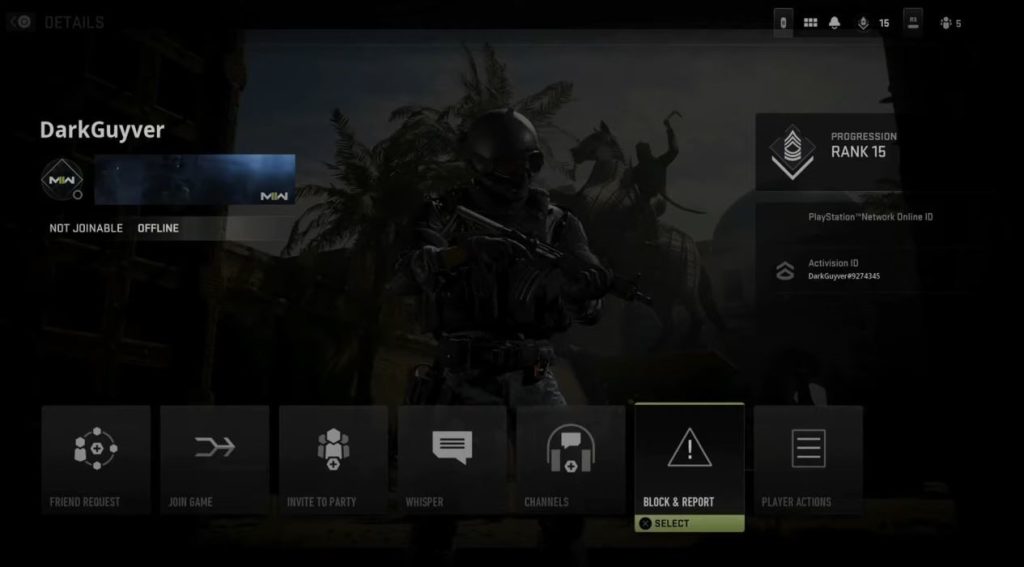
At the same time, if you want to report that player, simply choose the Report Player option. For this one, however, you need to provide the reason for the report. This could either be due to exploiting, cheating, using offensive language, boosting, and more.
The more accurate your information, the higher the chance of the player getting a ban.